ADHD Task Paralysis: 7 Steps to a Startable Micro-Task
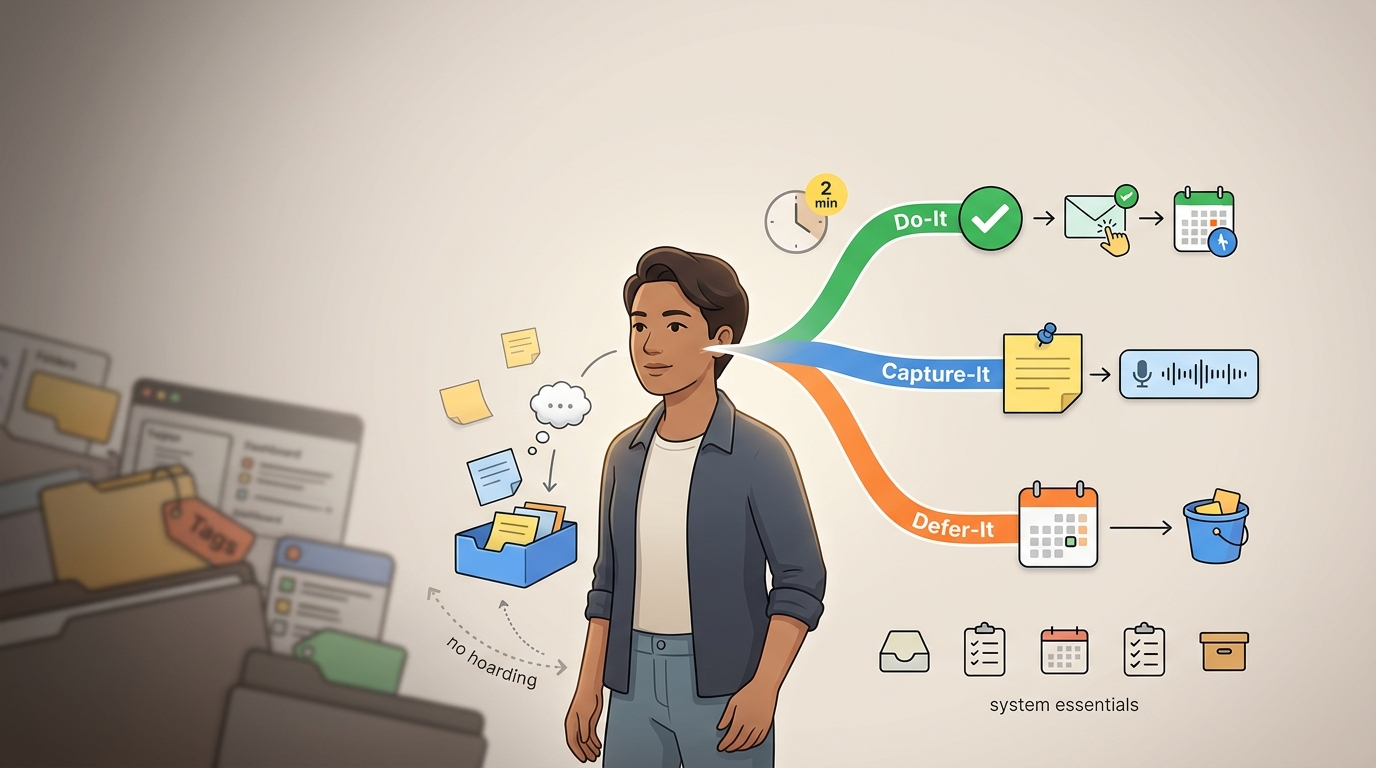
Turn one overwhelming project into a scheduled micro-task with seven steps: capture the mess, name the outcome, pick a tiny timed action, prep and schedule it..
What This Guide Means by "Translator" and "Micro-Task"
Two mix-ups tend to bring people to a title like this one, so let's clear them up before anything else. This is not a language translation service, and the word "micro-task" here has nothing to do with those paid gig platforms where you earn a few cents tagging images. When we say translator, we mean a method. And when we say micro-task, we mean a tiny scheduled action, small enough that starting it barely feels like a decision at all.
Here is the plain-language definition. The ADHD next-action translator is a method for turning a vague project into one tiny, specific, scheduled physical step. You take something formless and heavy, like "sort out the garage" or "get back on top of my finances," and you convert it into a single concrete move that has a real time attached to it. It was not a plan and not a system; it was one step and one when.
By the end of this guide, you will be able to take one project that currently overwhelms you and produce a single visible next step that lives somewhere you'll actually see it, tied to a time you'll actually notice. Our goal is narrow on purpose, because it is one project, one step, one reminder rather than a color-coded life dashboard.
We want to be honest with you up front, because that honesty is part of what makes the method usable: no single technique fixes ADHD. This isn't a cure, and it isn't a substitute for clinical support. What it does is lower one specific barrier, the barrier to starting, which for a lot of people is the exact place everything falls apart.
Why Starting Feels Impossible Even When You Want To
The real problem has a name, and the name is task initiation. It's an executive-function skill, the mental machinery that gets you from "I should do this" to your body actually beginning. When that machinery misfires, you can want to start with everything you have and still sit frozen. That is worth saying plainly because so many people carry the opposite belief: this has nothing to do with laziness or weak discipline. A person who cries because they can't make themselves open one email is not lacking willpower.
It helps to separate two things that look identical from the outside. Procrastination carries an element of choice, a "I'll do it later and I'm sort of okay with that" flavor. Task paralysis is different. It's a freeze response, where you genuinely want to start, you may even be panicking about not starting, and you still feel stuck to the chair. Naming which one is happening changes what you do about it, because you can't discipline your way out of a freeze.
The clinical researcher Russell Barkley describes ADHD as an intention deficit or a performance disorder rather than a knowledge problem (Russell A. Barkley). His point is sharp and freeing: people with ADHD usually know exactly what to do. The breakdown is in doing what you know, when and where it needs to happen. The information is intact. The connection between the information and the action, on time, is what slips.
One reason that connection slips is time blindness. Internal time cues are unreliable, so a task that isn't happening right now feels abstract, distant, almost fictional. Anything without a felt deadline gets quietly filed under "later," and later never arrives with a specific shape. The task simply floats.
There's also a hidden weight inside a vague task. A heading like "do taxes" looks like one thing, but it secretly demands a stack of decisions before a single action is possible:
- where to even start
- how long the whole thing will take
- what order the pieces go in
- what could go wrong and trip you up
Facing all of those at once, before you've done anything, is enough cognitive load to trigger a shutdown. The brain protects itself by looking away.
Sitting underneath all of this is an emotional layer that blocks starting before starting is even on the table: fear of failing again, perfectionism that whispers there's no point unless it's done perfectly, and shame accumulated from every past attempt that fizzled. That layer is often the real reason the document stays closed.
Here is the reassuring mechanism that the whole method rests on. Starting is harder than continuing. Once you're two minutes into something, momentum tends to carry you. So the entire job of this method is making that first step small enough to trigger the momentum you already have inside you.
Step 1: Dump the Messy Context Before You Try to Organize It
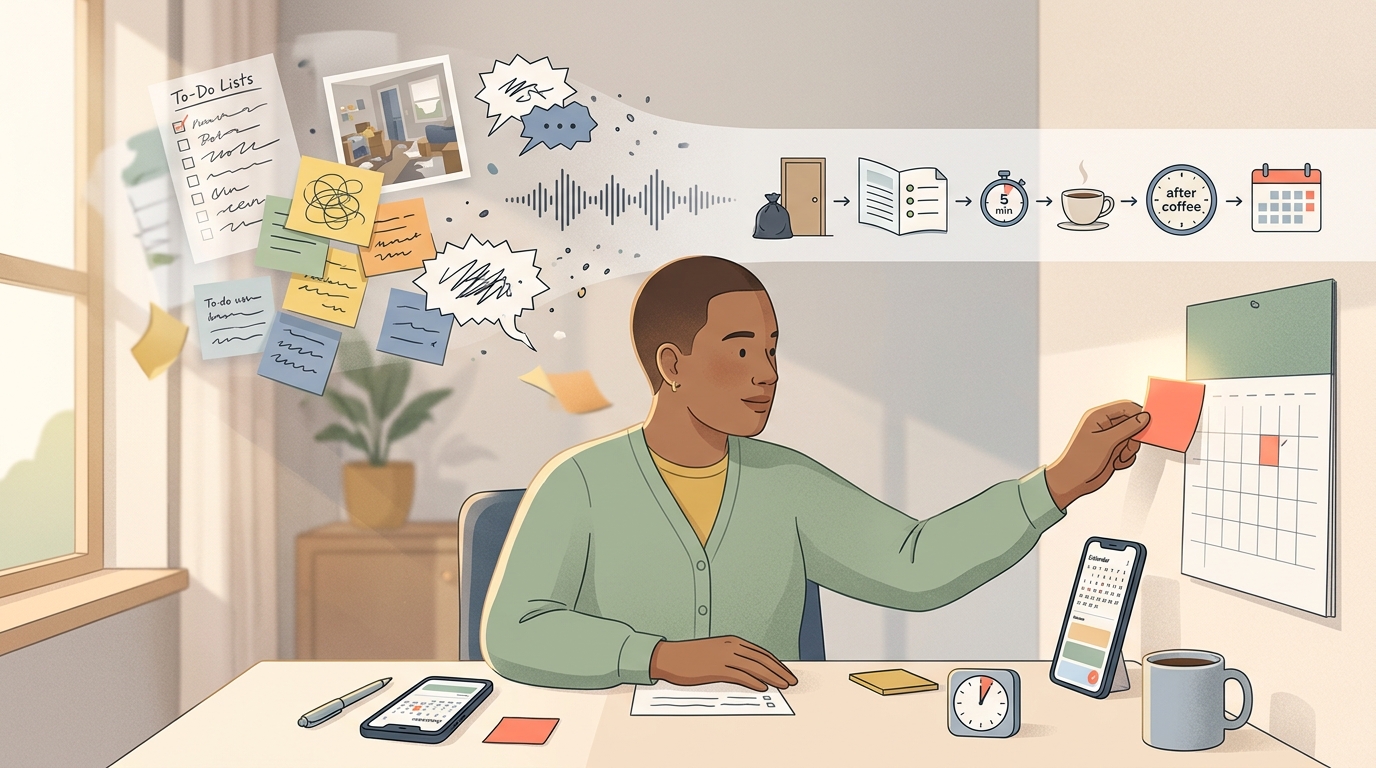
Capture comes first, and it comes separately from planning, for a mechanical reason: your working memory is limited, and if you try to organize thoughts while they're still arriving, you'll lose half of them in the shuffle. Planning and capturing at the same moment is like trying to catch water and pour it into labeled jars in one motion. So you catch first. You label later.
What counts as valid capture is looser than most people assume. You do not need clean sentences. Any of these are a legitimate starting point:
- a 30-second voice note talking through the mess out loud
- rough half-sentences that only make sense to you
- an incomplete list with three items and a trailing dash
- a photo of the actual pile, the desk, the paperwork
The brain-dump principle, which the ADHD nonprofit CHADD teaches, is simply this: get everything out of your head and into one place, then translate it later, not in the same breath (CHADD). The dump is unfiltered on purpose. Judgment and sorting slow the flow, and the flow is the point.
Keep this step under a few minutes. Set a timer if that helps. The failure mode here is turning capture into its own overwhelming project, building an elaborate note structure before you've captured a single thing. If you catch yourself organizing, stop, because you've drifted into Step 4 too early, which is when a capture-first workspace earns its place. A tool like Yaranga is built around exactly this move: you record a voice note or type a rough thought, and it becomes something you can schedule later, without you first building folders to hold it. The two-second rule matters here, because if capturing a thought takes more than a couple of seconds to begin, you won't capture it at all. Speak, dump, move on. The organizing happens after.
Step 2: Name the Real Outcome You Actually Want
A vague project heading hides the true goal, and that hiding is what keeps you stuck. "Bike more with the kids" sounds like a goal, but it's really a wish wearing a goal's clothes. Naming the outcome underneath it is what surfaces the actual next action.
Example: Someone sets the project as "bike more with the kids" and gets nowhere for weeks. When they ask what they actually want, the real outcome turns out to be "make biking with the kids fun and safe." That reframe instantly exposes the obstacle nobody had named: the bikes needed tune-ups. Flat tires and rusty chains were the real reason no one wanted to ride. The moment the outcome was clear, the obstacle stopped hiding, and the next action ("book a bike tune-up") became obvious.
The question to ask is plain: what does "done" or "better" actually look like here? For "clean the garage," done might mean "I can park the car inside." For "get on top of finances," better might mean "I know what I owe and to whom." Answer that, and you've found the thread to pull.
There's a reason this step works especially well for ADHD brains. Big-picture vision often comes easily, sometimes too easily (BeeDone). It's the runway-level decisions, the small concrete "what do I touch first," that jam up. This step deliberately connects the two, using the vision you can access to point you toward the ground-level move you can't.
Step 3: Spot the Hidden Constraints and Decisions
A task that quietly requires a decision before it can begin will stay stuck no matter how many times you reschedule it, because you'll hit the same invisible wall each time. The fix is to surface those decisions before you try to schedule anything.
Certain constraints block action from the shadows:
- missing materials you don't have on hand yet
- a reply or piece of information you need from someone else
- a choice you haven't made (which contractor, which account, which room first)
- limited energy or a narrow window of time that the task doesn't fit into
Run a short self-check on the task to expose these:
- Do I know the very next action, specifically?
- Is that action discrete, meaning it's genuinely one step and not a bundle?
- What's the objective this action serves?
- Do I need help, information, or a decision from anyone before I can move?
If the answer to that last one is yes, notice what that tells you. Asking for help is an ADHD adaptation, a smart move that plays to how your brain works, not a personal failure. Sometimes the honest next action is rather than "write the report" "message my manager to clarify which section they actually need first." That message is a real, discrete, physical step. It counts, and it unsticks the thing.
Step 4: Find the First Physical Next Action
A next action is a discrete, visible, physical step, something you could watch a person do (David Allen). That word "physical" is doing real work. Vague verbs like "work on," "deal with," "handle," or "sort out" describe a mood, not a motion. Concrete verbs describe a motion: open, write, put, call, search, carry. If you can't picture the body doing it, it isn't a next action yet.
The rule that keeps you honest: anything requiring more than one step is a project distinct from an action. So if what you've written still contains several moves hiding inside it, you haven't broken it down far enough. Keep splitting until you reach something singular.
Example: Here's what that transformation looks like in practice:
- "Clean the house" becomes "put one trash bag by the front door."
- "Finish the report" becomes "open the document and write three bullet points."
- "Plan the trip" becomes "search flights for 10 minutes."
Notice you don't map the entire sequence. You only need Task 1. Take a messy living room: you don't need to plan the whole clean-up, decide on storage bins, and schedule a deep scrub. You just need the single starting move, "collect all the dishes into the sink." That one action is enough. Finding Task 1 without charting the rest is the skill here, because charting the rest is often what triggers the shutdown in the first place.
Step 5: Shrink It to a Time Box That Feels Easy Enough
There's a litmus test for whether your step is small enough, and it's refreshingly subjective. You look at the action and think, "that seems easy enough." If part of you still flinches, it's too big. Shrink it again. The target is a step so light it feels almost silly to resist.
Attaching a time box makes it lighter still, because a bounded amount of effort is easier to agree to than an open-ended one. You have options:
- the 5-minute rule: commit to just five minutes and stop if you want
- a 10-minute activation window to get moving
- a 10-to-15-minute single-task focus block
- a Pomodoro (a timed work interval, classically 25 minutes, followed by a short break) (Emory Libraries)
A word of honesty about the 5-minute rule specifically. It's mechanistically plausible and very widely used. But it has not been independently proven in dedicated trials as its own named technique. Treat it as a practical starter that many people find helpful, not a guarantee.
If clock minutes feel arbitrary, which they often do when time blindness makes "ten minutes" mean nothing to your gut, anchor the box to something concrete instead:
- the time it takes to fry an egg
- a walk of two blocks
- listening to two songs
And a correction that saves a lot of frustration: whatever you estimate the action will take, double it. Time blindness runs optimistic. The doubled number is usually closer to the truth, and planning around it means you won't feel like you failed when the "ten-minute" job takes twenty.
Step 6: Attach Time, Place, and Tools So There Is No Friction Left
Barkley's point-of-performance principle drives this step. The idea is that executive-function problems are best solved by changing the environment at the exact moment and place where the action needs to happen, rather than relying on internal motivation to show up on cue (Russell Barkley). Internal motivation is unreliable for ADHD brains. The environment isn't, if you set it up in advance.
So you decide the first step ahead of time and lay out the materials now, while you have a bit of capacity, so that the future start requires almost no thought. If tomorrow's action is "write three bullet points," open the document tonight and leave it open. If it's "go for a walk," set the shoes by the door. Every object you pre-position is one decision your future self doesn't have to make from a cold start.
Anchoring beats abstract time slots. Instead of "I'll tidy at some point in the evening," tie the action to a routine that already happens reliably.
Example: "After I pour my morning coffee, I collect the dishes into the sink." The existing habit becomes the trigger, so you're not depending on remembering out of nowhere.
Then make it a concrete appointment with a real when and where. Rather than “clean the living room” floating in the ether, "15 minutes to tidy the living room, at 7 p.m., starting with the coffee table." A specific time and a specific spot leave nothing left to negotiate in the moment.
Step 7: Schedule the Reminder So the Task Becomes Visible Later
For ADHD brains, out of sight really is out of mind, so the reminder has to be external and visible (NAPA Center). A plan that lives only in your head is a plan that evaporates the moment something shinier appears. It needs to exist somewhere outside of you, on a calendar, a whiteboard, a phone alert, a sticky note on the laptop.
Set the reminder for when preparation needs to start, not only for the event itself.
Example: A reminder that pings you at 7 p.m. for a 7 p.m. task is often too late, because at 7 p.m. you're already mid-something-else. If the task needs you to change clothes or gather items first, the reminder should fire when that prep needs to begin.
Reminders go numb fast if you overuse them, so protect their signal:
- use few of them, so each one still means something
- make each one specific ("collect dishes into sink," not "clean")
- pair the digital alert with a physical cue, a sticky note or a line on a whiteboard, so it hits two senses
Whether you go paper or digital comes down to one question: what will you actually check (ADDA)? A gorgeous app you never open loses to an ugly sticky note you pass every morning. The ADHD organization ADDA puts it well: the best system is the one you use consistently. Choose for reliability, not elegance.
Worked Examples: Watching a Vague Project Become a Scheduled Micro-Task
Let's run three relatable projects through all seven steps so the sequence stops being abstract.
Clean the bedroom. The outcome you actually want is a room calm enough to sleep in, free of magazine-spread gloss. The hidden constraint is that the mess is mostly clothes with no clear home, so the real block is decision fatigue about where things go. The first physical next action is "put all clothes from the floor onto the bed." The time box is ten minutes, doubled from your gut estimate of five. You schedule it for 8 p.m., anchored to "after I brush my teeth," with the laundry basket already positioned in the room. Before: "clean the bedroom" (a heading you've ignored for two weeks). After: "8 p.m., 10 minutes, move floor clothes onto the bed, basket is ready."
File taxes. The outcome is "taxes submitted and off my mind," but naming it exposes the constraint immediately: you're missing one income document and haven't decided whether to use software or an accountant. The honest first action isn't "do taxes," it's "email the accountant to ask what documents they need." Time box: five minutes, because writing one email is genuinely small. You anchor it to "right after morning coffee" and set a reminder for 8:45 a.m. with a sticky note on the coffee machine. Before: "file taxes" (a heading that spikes your heart rate). After: "At 8:45 a.m., spend five minutes emailing the accountant to ask for their document list."."
Finish a report. The outcome is a feedback-ready draft rather than a flawless final version, and that reframe alone deflates the perfectionism that's been keeping the file closed. There's no missing material, so the constraint is purely the freeze. The first physical action is "open the document and write three bullet points of what it should cover." Time-box it as a single Pomodoro, and double the estimate so you don't feel behind if it runs long. You schedule it for 10 a.m., document left open on the desktop the night before. Before: "finish the report" (a task that's been rolled over for days). After: "At 10 a.m., do one Pomodoro, write three bullet points, and make sure the doc is already open."."
The Copyable Next-Action Translator Template
Here's a reusable worksheet you can rebuild anywhere, on paper or in a note. Each column maps to a step you've already learned.
| Column | What goes here | Comes from |
|---|---|---|
| Project | The vague thing as you'd say it out loud | Step 1 |
| Desired outcome | What "done" or "better" actually looks like | Step 2 |
| Next action | The discrete, physical first move | Steps 3–4 |
| Micro-task version | The shrunk, "easy enough" version | Step 5 |
| Time estimate | Your guess, then doubled | Step 5 |
| When | Anchored time or routine | Step 6 |
| Where | The physical spot it happens | Step 6 |
| Tools needed | What to lay out in advance | Step 6 |
| Backup task | An easier fallback for low-motivation days | design rule |
| Save for later | A brain-dump box for stray thoughts that pop up | design rule |
Because the columns follow the seven steps in order, the worksheet is close to self-explanatory: you read left to right and you've walked the whole translation.
A filled-in row to copy:
| Project | Desired outcome | Next action | Micro-task version | Time estimate | When | Where | Tools needed | Backup task | Save for later |
|---|---|---|---|---|---|---|---|---|---|
| Clean the garage | Park the car inside | Clear one path to the back wall | Move 5 boxes off the floor | 10 min (est. 5, doubled) | After Sat. coffee | Garage | Empty bin, gloves | Just open the garage door and stand in it for 2 min | Ask neighbor if they want the old shelving |
Two design rules are baked in on purpose. The backup task exists for the days your fuel gauge reads empty, so you always have a truly tiny fallback instead of a blank line and a guilt spiral. And the save-for-later box doubles as your brain dump from Step 1, so stray thoughts have a home the second they appear rather than derailing the row you're on.
Scheduling Micro-Tasks Without Overloading Your Day
There's a limit that quietly decides whether you follow through: keep it to one to three real next actions per day, with a hard ceiling of around five slots. Time blindness makes everything look doable at planning time, which is exactly why a wide-open calendar tempts you into scheduling a week's worth of energy into a single Tuesday. Three genuine actions you complete beats ten you abandon.
Leaving buffer time matters more for you than for most people, precisely because of that optimism about time. If you fill every hour back to back, the first task that runs long topples the entire row like dominoes. Empty space in the calendar isn't wasted; it's the shock absorber that lets a bad estimate not wreck the day.
On structure, you have a genuine choice. Broad blocks (morning, afternoon, evening) suit people who find a rigid hourly grid stressful and unrealistic, because the grid demands a precision your sense of time can't deliver. An hourly grid suits people who feel unmoored without exact anchors. Try one for a week, notice whether you feel held or trapped, and switch if it's trapping you.
Adopt a carry-forward rule so unfinished tasks simply move to the next day. No rewriting the whole plan, no self-flagellation, just slide the item forward. The point is to strip the guilt out of an incomplete day, because guilt is what makes people abandon the system entirely.
And keep an eye on the repeat offenders. If one item keeps getting rewritten and rolled over, that's a diagnostic signal, not a character flaw. Ask which of four things is true:
- It's still too big and needs another round of shrinking.
- It's genuinely dreaded, and the real work is regulating the emotion around it.
- It's no longer actually important and can be dropped.
- Someone else has already handled it and it can be crossed off.
When Even the Micro-Task Feels Too Hard
Some days the smallest step still won't move, and that's usually a nervous-system problem before it's a planning problem. Regulate first. A brief burst of movement, a short walk, cold water on your face or hands, or a minute of slow breathing can shift you out of the freeze state. You're not trying to feel motivated; you're trying to unlock the body enough to try again.
Then shrink the step further, past the point that feels reasonable, until it genuinely passes the "easy enough" test. If "write three bullet points" is too much, the action becomes "open the document." If that's too much, it becomes "sit in the chair with the laptop." There's no shame floor here. Small enough is whatever your brain will actually accept today.
Body doubling can help when you can't generate a start alone. Having another person present, in the room or on a video call, even silently working on their own thing, provides the external presence that gets you moving. You're borrowing their momentum until yours kicks in. Plenty of people keep a virtual co-working call open for exactly this reason.
Reduce decision friction by removing options rather than adding them. Don't ask which of three tasks to start; pre-decide the one and hide the rest. Pair the task with a small reward or a pleasant cue, your favorite drink beside you, a specific playlist that means "we're working now," so the start carries a little pull instead of only push.
And hold onto this: the ability to start strengthens with repeated practice, the way a muscle does. A hard day where nothing moves isn't a failed system. It's one rep you didn't finish, in a training process that's still working.
Where Tools Fit (Only After the Translation Is Done)
Order matters, because a tool introduced too early becomes just another rabbit hole to disappear into. The sequence that keeps that from happening: translate the project first, then schedule the next action, then let a tool remind you. The thinking comes before the software, always. A tool cannot decide your outcome or find your first physical action; it can only hold what you've already worked out.
When a task still feels too big to split by hand, purpose-built breakdown helpers exist for exactly that. Goblin Tools, for example, takes a fuzzy task and breaks it into smaller pieces automatically, so you have something to react to instead of a blank stare.
In whatever scheduler you land on, a handful of features genuinely help:
- a visible calendar you'll actually glance at
- customizable reminders you can time to preparation, not just the event
- duration estimates, so time boxes live inside the tool
- easy rescheduling, so the carry-forward rule takes one tap
- low clutter and no intrusive ads pulling your attention sideways
The categories are worth knowing without treating any as a cure: calendar-first apps that put time at the center, task managers built around lists and next actions, visual boards for people who think in space and cards, and ADHD-specific planners designed around these exact struggles. None of them fixes task initiation. They hold your translation so it doesn't evaporate.
This is where a capture-first workspace closes a specific gap, the one between a rough voice note and a scheduled to-do. In Yaranga, tasks live inside notes, so a 30-second voice memo transcribes into text and the actionable pieces get pulled out and placed on your schedule, without you first constructing a folder hierarchy to file them in. The "Today" tab shows what's due, a "No Date" view gathers everything unscheduled in one place, and each task links back to the note it came from, so context is never lost in the handoff. A note without a next action is just a bookmark; the value is in closing that loop automatically, which is the same loop this whole method is built around.
Honest Words on What the Evidence Does and Does Not Show
We'd rather you have accurate expectations than inflated ones, so here's where the research actually stands. Structured CBT for adult ADHD has real peer-reviewed support, with reported effects on core symptoms ranging from roughly 0.32 against active controls to about 1.03 against waitlist, and it is endorsed as a first-line intervention alongside medication (PMC). That's a genuinely established treatment, and this article is not it.
The honest caveat is that individual tactics, like the 5-minute rule, are plausible and useful, but they haven't been independently proven in their own trials. So treat this method as a scaffold, a way to structure the start, not as a treatment in itself.
Medication belongs in the picture too, with its own limit. It can improve focus for many people, but it does not by itself teach you the habit of breaking work into next actions. The chemistry and the skill are separate things; improving one doesn't automatically deliver the other.
Why does all this matter for you specifically? Because the translator lowers the barrier to starting, and that's a real and worthwhile job, but it does not replace clinical support. If ADHD is significantly disrupting your life, a scaffold like this works best alongside proper help, not instead of it.
Common Mistakes That Quietly Break the System
A few predictable errors are what usually pull the whole thing apart, and they're easy to catch once you know them.
The most common is writing tasks that are still vague, still too big, or still holding a hidden decision inside them. If your "next action" makes you flinch, it failed Steps 3 through 5, and no amount of scheduling will rescue it.
Close behind is scheduling too many actions and treating the calendar like a wish list rather than a realistic plan. A day stuffed with fifteen intentions isn't ambition, it's a setup for the guilt spiral. Respect the one-to-three cap.
Then there's ignoring transitions and forgetting to lay out materials, so that when the moment arrives, starting still demands effort you don't have. The point-of-performance work in Step 6 exists precisely to prevent this, and skipping it quietly reintroduces all the friction you worked to remove.
Another trap is choosing a planner so elaborate that maintaining it becomes the new avoided project. If you're spending Sunday tuning your system instead of doing tasks, the system has become the procrastination.
And the foundational mistake: skipping capture and trying to plan straight from an overloaded head. Without the brain dump in Step 1, you're organizing while thoughts are still leaking out the sides, and the plan you build will be missing pieces you never even got to see.
Where to Start Tomorrow Morning
Pick one stuck project, only one, and run just the first three steps on it before you go anywhere near a scheduler. Dump the messy context out of your head, name the outcome you actually want, and find one physical next action. That's the entire assignment. Leave time boxes, calendars, and reminders for after you've done those three, because reaching for the tool too early is how people end the morning with a beautiful app and an untouched project.
Watch for one signal that tells you it's working: whether your next action is small enough to begin in under ten minutes with no further planning. If you can look at it and just start, the translation succeeded. If you still need to think before you can move, shrink it once more.
Build this through repetition rather than chasing a perfect setup on day one. The first few translations will feel clumsy, and the point-of-performance habits take a while to become automatic. That's expected, and it's fine. Every project you run through the seven steps trains the exact skill that's been missing, and the training is what matters more than the perfect first attempt.
Ready to conquer your chaos?
Join others who have simplified their tasks and notes with Yaranga.
Get Started for Free