
PKM for ADHD: The 3-Way Rule for Scattered Thoughts
Apply the Do it /Capture it/Defer it rule with a minimal setup and daily/weekly review to stop freezes, sustain focus, and turn scattered thoughts into actions.
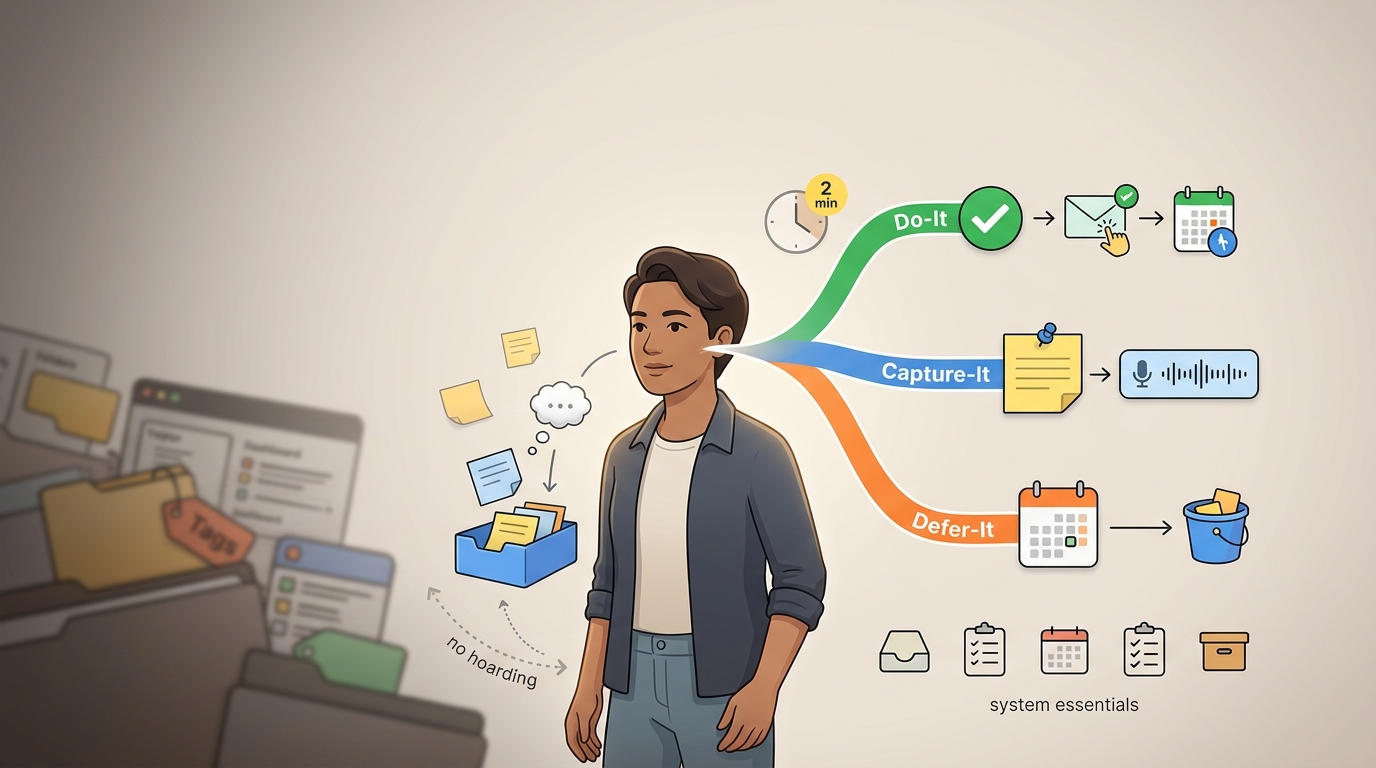
When a thought arrives mid-task, we route it to one of three destinations instead of deciding where it belongs in a system: do it, capture it, or defer it. That is the entire rule. It exists to kill the freeze that hits at a very specific moment: a thought lands, and you stall on whether it should be a task, a note, or a reminder, and which folder it belongs in. By the time you have answered, either the thought is gone or you have abandoned what you were doing to chase it.
That freeze is expensive. Every dropped thought is a follow-up you forgot, a bill you paid late, a good idea that never became anything. Every derailment can cost you the rest of a focus session you had to fight to enter. And the standard advice, build a better system with cleaner tags and smarter databases, makes it worse, because it adds more decisions to the exact moment you are already stuck.
We built this guide around one decision instead of five. The steps below set up the minimum system that makes the rule work, walk through each of the three branches with real examples, and cover the review that keeps the whole thing from silently filling up and collapsing.
Why Standard PKM Systems Break Down for ADHD Brains
The failure is not that you do not know how to organize. Durand and colleagues (2020, N=774) compared adults with ADHD against controls across executive-function domains, and the Strategies domain, which measures whether people use organizational strategies at all, came back with an effect size of d=0.06. That was the only non-significant domain in the study. Adults with ADHD reach for organizational strategies at nearly the same rate as everyone else.
The gap sits one step later, in follow-through. The same study found large deficits in Attentiveness (d=1.12) and Assiduity (d=1.06), the domains that govern sustained persistence on a task over time (PMC). This is why systems that demand constant upkeep fail specifically for ADHD brains: the setup is fine, but the maintenance, the daily re-tagging and re-filing and re-sorting, runs straight into the deficit. A system whose survival depends on you doing tedious upkeep every day is a system designed to fail you at your weakest point.
The instinct to fix this by training your memory does not hold up either. A meta-analysis of 23 studies on working-memory and brain-training found that gains do not generalize to daily life, so you cannot practice your way to a bigger mental scratchpad. The evidence points the other way: externalize the thought. Get it out of your head and into something reliable, because the head is the least reliable place to keep it.
Here is the trap that catches almost everyone. Faced with an unreliable memory, you build structure to compensate, so you create more folders, add more tags, and set up more views. But each of those is another decision at capture time, and stacking decisions recreates the analysis paralysis the structure was supposed to solve. The r/PKMS forums are full of this exact arc, where people leave Notion for Todoist because the nesting got too confusing to think through, or deliberately switch to a more restrictive phone to cut off the endless configuration. The system meant to reduce overwhelm becomes the source of it.
So this rule does not touch system design at all. It targets the moment of decision, which is where the actual problem lives. Durand's own recommendation was to provide help at the moment of performance rather than expecting better upstream planning. That is the entire premise here: make the in-the-moment decision trivially small, and the rest takes care of itself.
The Do-It, Capture-It, or Defer-It Rule at a Glance
The rule replaces on-the-spot organizing with a single routing decision. When a thought appears, you are not deciding where it belongs in your system. You are sending it to one of three destinations and moving on. That swap, from a filing decision to a routing decision, is what makes it fast enough to survive contact with an ADHD brain.
Run the thought through three questions, in order:
- Does this require action? If no, capture it and stop. It is information, not a to-do, and it does not need a decision beyond getting written down.
- Can it be done in under two minutes without pulling you off your current priority? If yes, do it now and be done with it (David Allen).
- If it needs focused time, a specific context, or real energy, defer it to a review block where you will decide what to do with it properly.
Each branch protects something specific. Capture protects against losing the thought entirely, which is the failure that quietly destroys your trust in any system. Do-it protects your working memory by closing the loop before it can nag at you. Defer-it protects your current-task focus by refusing to let a thirty-minute job hijack a session you are already in the middle of.
One note on wording before we go further, because it trips people up: when we say capture, we mean offloading a thought into an inbox so your brain can let go of it. It has nothing to do with screen recording, screenshots, or photography tools. Capture is the act of writing the thing down somewhere you trust.
Step 1: Set Up the Minimum Viable Capture System First
Before you touch a single advanced feature, build the five components that everything else depends on: keep one inbox, maintain one task list, use one calendar, complete one weekly review, and rely on one archive. That is the complete system. If you have those five, you can run this rule for years. If you are missing the inbox, nothing else matters, because there is nowhere for thoughts to land.
Start with the inbox, and pick one always-available capture location (David Allen). Apple Notes or Google Keep both work: create a single note titled something like Idea Capture, pin it to the top, and make sure it syncs across your phone and laptop. No tags, no structure, no sub-notes. Just one note that opens fast and is always in the same place. The point is that when a thought hits, your hands already know where to go.
The habit that makes this work is a script you say out loud in the moment. The classic ADHD failure is intending to write something down later, which is the same as not writing it down, because later never has the context you have right now. So when a thought lands mid-conversation or mid-task, you say, "hang on, let me write that down now," and you actually do it in that second. The friction you are fighting is the two seconds of activation energy it takes to start capturing. If starting takes more than two seconds, you will not do it, which is why the location has to be instant and the method has to be effortless.
Rank your input methods by how much effort they take, and reach for the lowest-effort one that fits the moment:
- Voice-to-text for when your hands are full or typing feels like too much. A voice memo on a walk gets you a couple hundred words of raw thinking in under a minute, far more than you would ever type (Adjust Clinic). Phone voice memos, OneNote, or Otter all work.
- One-tap mobile note for short text thoughts, straight into the pinned inbox note.
- Social reminders for tasks other people have handed you. When you delegate or hand something off, add the line "if you have not heard from me by [date], remind me," which offloads the follow-up tracking onto the other person instead of your working memory.
What you do not build yet: folder trees, tag taxonomies, backlinks, dashboards, or color-coded databases. Every one of those is a configuration project disguised as productivity, and we cover why they backfire in the mistakes section below. For now, resist all of it. A flat inbox and a capture habit beat an elegant structure you never fill.
Step 2: Apply the Do-It Branch Correctly
The two-minute test is a hard filter to be enforced. If a thought requires action and you can finish that action in under two minutes without leaving your current priority, you do it immediately. The reason is mechanical: an open loop, a thing you know you have to do but have not done, sits in working memory and consumes attention until it closes (PMC). Spending ninety seconds now to clear it costs less than the ambient drag of carrying it around all afternoon.
What actually qualifies for Do-It is narrow and concrete:
- Replying to a one-line message that needs a yes or no.
- Adding an event to your calendar the moment someone gives you a date.
- Throwing out the mental note by simply doing the small physical thing, hanging up the coat, moving the dish, sending the confirmation.
There is one override that beats the two-minute rule: if the task, even a thirty-second one, will fracture the focus you are currently in, you defer it instead. Opening your email to send a one-line reply is technically fast, but if you are mid-flow on real work, that tab will pull you under for the rest of the session. Focus fragility outranks task speed. When in doubt about whether acting now will derail you, capture it and keep going.
The moments to run this test are the ones where a small action is right in front of you: mid-chore, when you notice the recycling is full; mid-work-session, when a quick reply would close a loop; or walking past something that needs exactly one action to resolve. If it is truly one step and it will not derail you, do it and forget it.
Step 3: Apply the Capture-It Branch Without Hoarding
Capture is for everything that is useful but not urgent and has no clear home yet: ideas, quotes, references, half-formed plans, links you want to come back to, the name of a book someone mentioned. If a thought does not demand action but you would regret losing it, it goes in the inbox.
Keep the capture action itself under five seconds, because the moment it competes with the thought that triggered it, you lose one or the other. You are not writing a clean, well-titled, properly filed note. You are dumping the raw thought into the inbox and moving on. Aesthetics happen later, if ever.
The guardrail that keeps capture from becoming a hoard is treating the inbox as a holding area, not a permanent library. Grolleman calls the alternative the vast desert of knowledge: thousands of saved items you never look at again, which is something other than a second brain a graveyard. Everything in the inbox is temporary until the review touches it. If it never earns a next action or a place in the archive, it is not building anything for you.
One discipline at capture time keeps the review clean: decide, in the moment, whether the thing is a note or a task (GTD). A note is information you might want later. A task is something you have to do. A note without a next action is just a bookmark, and a task buried inside a note is a task you will never see again, so keep the two distinct as you drop them in. This one habit is the difference between a review that flows and a review that turns into a sorting nightmare.
Step 4: Apply the Defer-It Branch as a Real Commitment
You defer when the thought needs something you do not have right now: focused time, a specific context (you can only do it at the office, or when you have the file open), or a slot on the calendar or a project plan. Defer is the branch for real work that deserves more than two minutes and more attention than you can give it while doing something else.
Deferring is not the same as leaving the thought in the inbox. A deferred item gets a destination assigned to it, or it is it is not deferred abandoned. It goes onto a task list with a date, into a calendar slot, or into a project bucket where it will actually resurface. Dropping something in the inbox and calling it deferred is how inboxes balloon into an unmanageable pile. The commitment is the assignment.
When you assign the destination, show only the next action and hide everything downstream. People in r/adhdwomen have described this as the single change that made task chains usable: surface only the first step, keep the dependencies collapsed, and the wall of downstream sub-tasks stops triggering overwhelm before you have started. "Book the venue" is doable. "Plan the entire event," with its twelve visible sub-tasks, is a wall you bounce off. Write the next physical action and let the rest stay hidden until you get there.
If a flat task list is not enough, because you have genuine projects with many moving parts, sort defers using PARA, which organizes around active work rather than abstract categories: (Tiago Forte)
- Projects: things with a defined outcome and an end (launch the site, file taxes).
- Areas: ongoing responsibilities with no end date (health, finances, a specific client).
- Resources: reference material you are keeping for later use.
- Archives: anything finished or dormant, out of sight.
The reason PARA holds up where folder trees do not is that it maps to what you are actively doing, so deciding where something goes is a fast question, separate from taxonomy debate.
Step 5: Run the Review That Converts Captures Into Next Actions
Capture without a review cadence becomes the exact overwhelm it was meant to prevent. This is the non-negotiable part. An inbox you never process is just a slower way to lose things, because you stop trusting it and stop looking. The review is what turns raw captures into next actions, and it is the step people skip that quietly kills the whole system.
Set a predictable cadence, with a quick daily pass that empties the day's captures and a fuller weekly sort that handles everything else (David Allen). Predictability beats frequency here. A review at the same time every day, even a short one, survives because it becomes automatic, whereas an ambitious "I will review whenever I get to it" schedule tends not to last. Attach it to something you already do, like your first coffee or the end of your workday.
The review procedure, in order:
- Read each inbox item and re-run the three-way rule on it. Now that you have time, that thirty-second task you deferred yesterday gets done, and that half-formed idea gets a decision.
- Convert every actionable item into a specific next action that starts with a verb. "Sarah proposal" becomes "email Sarah to confirm the proposal budget." A vague noun is not a next action; a verb phrase is.
- Mark or migrate each processed item so it leaves the inbox. Kirkman's method is to mark pages as processed as you go, so you can see at a glance what is done and what is still raw. The inbox should visibly shrink as you work through it.
- Send everything else to the archive or a later/maybe parking lot. Not every captured thought earns a next action, and that is fine; it gets filed or dropped, but it does not stay in the inbox.
Reserve a time buffer so review and deferred work actually fit into real days. Plan roughly 6.5 hours of task time in an 8-hour day, the 20% buffer rule, because the overflow, the interruptions, and the tasks that run long need somewhere to go (PMI). A day planned to 100% capacity has no room for the review itself, which is how the review gets skipped first.
Finally, build a reality check into the habit: log how long deferred tasks actually take, not how long you thought they would. Kirkman documented a task he estimated at 90 minutes that took 4.5 hours. Over a few weeks, this gives you a personal time database that makes your planning honest instead of optimistic. Tools like Toggl or Memtime work if they are low-friction enough for you to sustain; if logging becomes its own chore, drop it and just note the big misses.
Here is how the pieces of the rule and the review fit together across a normal day. Times serve as illustrations rather than prescriptions; your own numbers come from the reality-check habit above:
| Moment | What you do | Where it goes |
|---|---|---|
| Thought arrives, no action needed | Capture it | Inbox |
| Thought arrives, action under 2 min, no derailment | Do it now | Done |
| Thought needs time, context, or energy | Defer with a destination | Task list / calendar / project |
| Daily quick pass | Empty the day's captures, run the rule on each | Next actions or archive |
| Weekly full sort | Process everything, convert to next actions, log time | Projects, archive, parking lot |
Applying the Rule in the Tool You Already Have
Lead with the behavior ahead of the app. The rule works on paper, in a stack of index cards, in voice memos, or in whatever note app is already on your phone. It requires no paid software and no migration. Pick the tool you will actually open in the moment, and change how you use it before you change what you use.
Here is what our own daily loop looks like in practice, and it is deliberately unglamorous: one pinned inbox note collects everything as it lands during the day; at end of day we open it, re-run the three questions on each line, and move each item to either a dated task or the archive. The screenshot below shows a typical inbox mid-day, six raw lines, before the review touches any of them.
[Screenshot placeholder: a flat inbox note with six unsorted raw captures, no tags]
[Screenshot placeholder: the same inbox after a daily pass: two items converted to dated tasks, one deferred to a project, three archived, inbox back to empty]
Implementation notes by tool type:
- Fast capture (Apple Notes, Google Keep): one inbox note, filed once daily during your quick pass. Add hashtags only after the capture-and-review habit has stuck, never before, because tagging an empty system is procrastination with extra steps.
- Task and reminder tools (Todoist, TickTick, Things): defer actions into scheduled lists with dates. Ignore streaks, Karma, labels, and kanban views until you feel a concrete need for one; the gamification and the extra views are configuration bait.
- Linked-note tools (Obsidian, Logseq, Roam): capture flat first, and organize only during review. Resist the urge to backlink every note as you write it, which is the exact behavior that turns these tools into a maintenance job.
- Notion: use one or two simple databases and nothing more. The problem with Notion is never the tool, it is that the flexibility invites you to build for thirty minutes before you feel productive. Treat that flexibility as the risk it is.
- Voice-first (voice memos, Otter): speak the thought in the moment, and transcribe it during review. Raw audio that never becomes text and never gets a next action is just noise you have to listen to later, so the transcription-and-decision step is not optional.
This is also where AI-assisted clarification earns its place, but only as a review-step accelerator, not a capture-step gatekeeper. The bottleneck for most people is not writing the thought down, it is turning a vague line like "Sarah proposal" into a verb-first next action during review. A tool that reads your raw captures and suggests the actionable item, "email Sarah to confirm the proposal budget," collapses the slowest part of the loop. That is the specific gap a lighter thought-to-action tool like Yaranga is built around: you drop the raw thought in, and it pulls the actionable items out and gathers your to-dos across notes so the "I had this idea" and "I need to do something about it" handoff does not get lost. Whether you actually need such a tool depends on how you score whatever you already use against six criteria: capture speed, setup effort, interface simplicity, how well it keeps you from getting distracted, whether it supports visual thinking, and how easily you can retrieve things later. If your current app already scores well on all six, you do not need to switch. Those six criteria matter more than feature count.
Common Mistakes That Turn the Rule Back Into Procrastination
The mistakes below are the ways this rule quietly reverts into the problem it was solving. Each one feels productive in the moment, which is what makes it dangerous.
- Building the perfect system before capturing a single thought. The dashboard becomes the hobby, and the dashboard is not the point. A flat inbox with real thoughts in it beats a beautiful empty structure every time.
- Capturing everything while reviewing nothing. This produces a digital idea hoard, the vast desert again, and an inbox you have stopped trusting. Capture and review are a single indivisible loop.
- Adding categories, tags, and views faster than you use them. Every unused tag is a decision you now have to make at capture time for no benefit. Add structure only when the flat system visibly hurts, never in anticipation.
- Treating every incoming thought as urgent. This collapses the three-way decision into one panicked pile where everything is a do-it-now emergency. Most thoughts are captures or defers; very few are genuine two-minute actions.
- App-hopping and novelty-seeking. Bouncing between apps, well documented across the ADHD forums, feels like progress and is actually a reset button on your habit. Every migration restarts the trust-building from zero. Pick one and stay long enough for the loop to run itself.
- Building a rigid system with no give. If your setup assumes a perfect day, one disrupted day breaks it and one broken day triggers abandonment. Treat your routines as adaptable guidelines, expect missed days as normal, and pick the loop back up without treating the gap as failure.
What to Fix First If You Only Change One Thing This Week
If you do nothing else, set up a single always-open capture inbox and start using the capture-now script. Everything else in this guide is optional refinement, but this one habit is load-bearing, because losing thoughts is the specific failure that erodes your trust in the whole system, and once you stop trusting the system you stop using it. Get the inbox instant, get the script automatic, and let the rest wait.
The one signal worth watching is whether your inbox is emptying at each review or steadily growing. An inbox that shrinks back toward zero every day means the rule is working and you are actually deciding on each item. An inbox that only grows means you have quietly reverted to capturing without deciding, which is the failure mode dressed up as diligence. Check that number, not how organized anything looks.
The next place most people get stuck is adding structure too early, so hold the flat setup until the daily capture-and-review loop runs on its own without you thinking about it. When capturing is automatic and the review empties the inbox reliably, you will know exactly what structure you need because a real bottleneck will tell you. Until then, resist it, and let the simplest possible version of the rule do its work.
Ready to conquer your chaos?
Join others who have simplified their tasks and notes with Yaranga.
Get Started for Free