Urgent: 5 Channels to Sweep for Lost Commitments Daily
Verify every commitment from email, calendar, WhatsApp, Telegram and meeting notes is in one register with owner deadline and context link. Add due dates today.
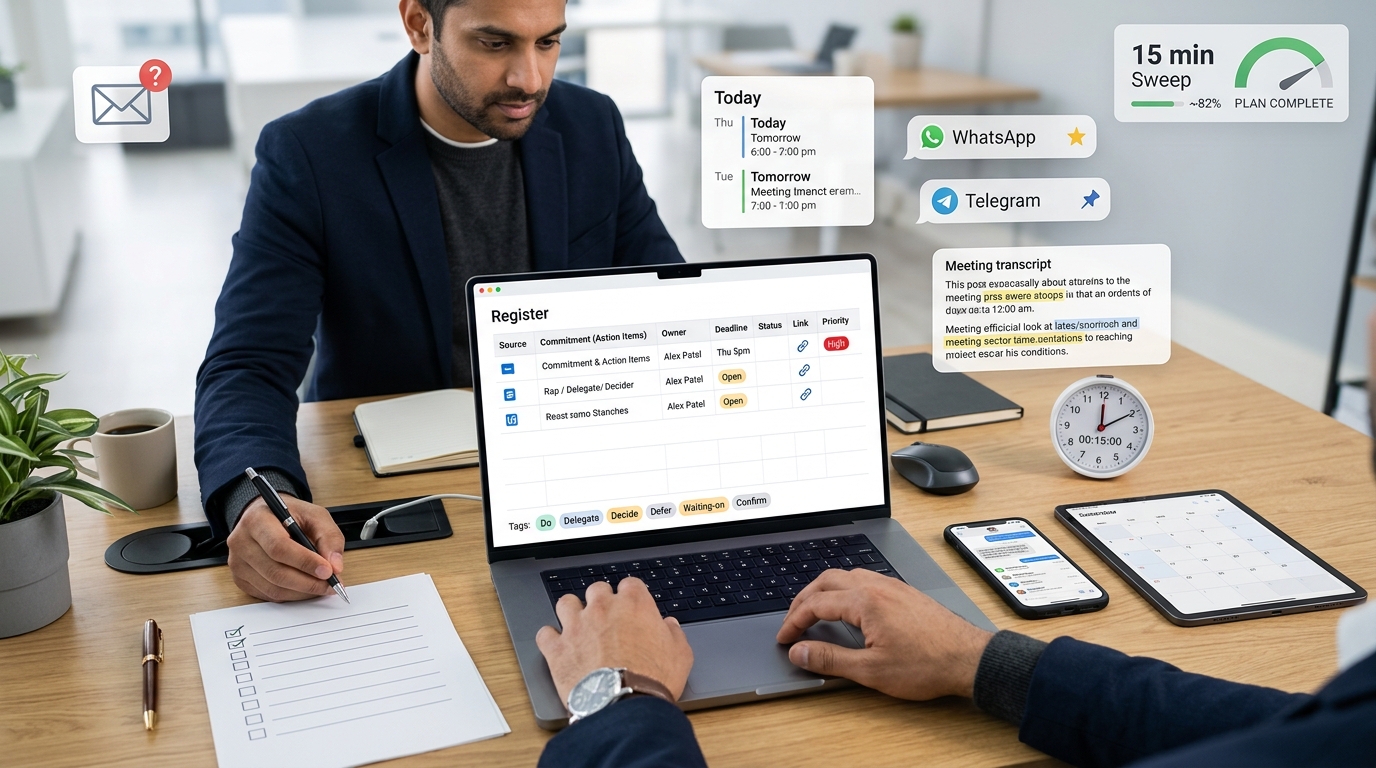
The 15-Minute Follow-Up Sweep is a fixed, timed daily review that scans every channel where commitments are born: email, calendar, WhatsApp, Telegram, and meeting notes, and drops each one into a single register with an owner and a deadline attached. We run it at the same time every day, in seven numbered steps. This article is that checklist.
Why bother: knowledge workers toggle roughly 1,200 times per day between apps and websites, losing just under four hours each week reorienting after each switch (Harvard Business Review). Executives sit in nearly 23 hours of meetings per week; founders run through five to eight meetings on a typical day. Each surface manufactures commitments faster than any single inbox can hold them.
What the 15-Minute Follow-Up Sweep Is (and Who Runs It)
We define the sweep as a repeatable daily review of the five channels where commitments actually get created: email, calendar, WhatsApp, Telegram, and meeting notes. It is time-boxed to 15 minutes, and its only output is a list of captured commitments that each carry a named owner and a due date.
The operating cost of skipping it, in hard numbers:
- ~1,200 app-to-app toggles per day, ~4 hours per week lost to reorientation (HBR).
- ~23 hours per week in meetings for executives (Harvard Business Review).
- 5–8 meetings per day for founders.
This is commitment-tracking and action-item capture. It is not the post-interview thank-you call or the sales cadence some people mean by "follow-up."
Who runs it: founders, operators, salespeople, recruiters, consultants, account managers, and project managers, anyone whose word to another person becomes work.
Our rule governs everything here: every captured commitment gets a named owner and a deadline. No owner or no deadline means it isn't captured, it's just noticed.
The Sweep in Seven Numbered Steps
The full operating sequence, top to bottom:
- Set up the capture register.
- Scan calendar and meeting prep (0–3 min).
- Scan email open loops (3–6 min).
- Scan WhatsApp and Telegram (6–9 min).
- Review meeting notes and transcripts (9–12 min).
- Convert everything to scheduled next actions (12–15 min).
- Review your reliability weekly.
Step 1: The Capture Template You Fill During the Sweep
Set the structure up before you scan a single channel. One commitment is one row (or one record). Fill these fields for each:
- Source / channel, which app and which thread it came from.
- Commitment / deliverable: the specific thing owed, worded concretely ("send revised deck," not "deck stuff").
- Owner: a named person. Never a team.
- Deadline or trigger event: a date, or the event that starts the clock ("after legal signs off").
- Status: pick one taxonomy and stick to it, open / in progress / overdue / completed.
- Link to original context: a link back to the thread, message, or transcript.
- Priority flag (optional): use only when items share a deadline and you need a tiebreaker.
The context link is non-negotiable. Weaker capture copies the message text and nothing else, so a week later you have a task with no idea why it exists. Stronger capture keeps a link back to the source, so the owner can reopen the thread and see what was actually agreed.
Run one seam test before you trust the system: take a real thread decision, convert it into a task now, then try to find that task a week later starting from the task, not the thread. If it leads you back to the original context, your capture holds. If it dead-ends, your link is missing.
Tag each commitment with its type so you know what action it demands: Do, Delegate, Decide, Defer, Waiting-on, or Confirm.
Step 2: Calendar and Meeting Prep (0–3 min)
Scan today's and tomorrow's events for the commitments hiding in them:
- Implied prep, attachments to read, agenda items you own, and deadlines buried in event descriptions.
- Whether the follow-up meetings from earlier today actually got booked today.
- Any pre-work you owe, or pre-work you're expecting from someone else before the meeting starts.
Log each as a commitment with its owner and deadline.
Step 3: Email Open Loops (3–6 min)
Work your sent folder, not just your inbox:
- Scan sent items for outgoing messages that end in a question mark. A question you sent means a response you're now waiting on.
- Scan for trigger phrases that mark an open loop: "Can you send," "I'll get back to you," "Following up," "By Friday," "Let me check," plus any request you received and haven't answered.
Log each open loop with an owner and a deadline. This step is manual because no Gmail add-on reliably automates the full rule: detect the question, wait, check for no reply, then prompt you to reply (Google).
Step 4: WhatsApp and Telegram (6–9 min)
- Scan starred and saved messages, pinned messages, group decisions, and shared files.
- Forward or copy each commitment into a task inbox outside the conversation. Do not leave it in the thread, because the thread will bury it.
- Optionally link the task to the specific contact, so it resurfaces the next time you talk to them.
Watch the visibility risk: a task you create from a shared chat may be visible by default to the clients or freelancers in that chat. Check where it lands before you type anything you wouldn't want them to read.
Step 5: Meeting Notes and Transcripts (9–12 min)
Pull the accountable parts out of every set of notes:
- Action items, owners, deadlines, decisions made, and open questions still unresolved.
If an AI note-taker produced the notes, run a human review immediately, in the same sitting:
- Verify every owner the AI assigned.
- Confirm every deadline it extracted.
- Add the implied commitments the AI may have missed, such as "I'll handle that."
- Delete the irrelevant items it invented from small talk.
Extraction accuracy drops on hedged language ("maybe I could look into"), overlapping speakers, and internal shorthand, which is why the review is mandatory rather than optional (ICSI Meeting Project). Treat the AI summary as a first draft, not a finished ledger.
Step 6: Convert Everything to Scheduled Next Actions (12–15 min)
- Route each captured commitment into a task manager, calendar event, or reminder with its owner and due date already attached.
- Break loose or multi-owner commitments into individual tasks (one owner each), and make anything repeating a recurring task.
- Confirm each item now lives in the central register rather than the chat or inbox it came from.
Follow-Up Message Templates (Copy-Paste)
Confirming a commitment you made:
Confirming I'll send [deliverable] by [date]. If anything changes on your end that affects that, let me know.
Requesting a missing owner for an unassigned action item:
From [meeting], we agreed [action item] needs to happen by [date], but I don't have an owner on it. Can you take this, or should I route it to someone on your side?
Polite nudge on an overdue item:
Circling back on [deliverable], which was due [date]. No pressure if timing slipped, just let me know a realistic date so I can plan around it.
Summarizing meeting action items for all attendees:
Recap from today. Action items: [1] [owner]: [task] by [date]; [2] [owner]: [task] by [date]. Decisions: [decision]. Open questions: [question]. Reply if I captured anything wrong.
Converting a chat or voice-note decision into written confirmation:
Putting our chat decision in writing so we both have it: we agreed [decision], with [owner] handling [next step] by [date]. Flag me if that's not how you remember it.
Where to Store Commitments and Which Tools Fit the Sweep
One accountability trail. Not a commitment in one email chain, a second in a spreadsheet, a third in a chat you'll never scroll back to. Everything captured during the sweep lands in a single central register.
Match the tool to the job it does inside the sweep:
- Email flagging: Gmail labels, Outlook flags, Superhuman, Spark.
- Calendar review: any calendar with reminder alerts, so implied prep surfaces before the event, not during it.
- AI meeting notes: Granola (setup under 5 minutes, deletes audio, SOC 2 Type 2 certified, $14/user/mo Business plan), Ademero, Otter, Fireflies, Fathom.
- Chat-to-task: forward-to-inbox flows and contact-linked task lists. Mind the platform limits: Slack's free tier keeps only 90 days of history, Teams Planner sits separate from the chat, and Google Chat is lightweight (Slack).
- Central task or CRM: Todoist, Notion, ClickUp, Asana, Linear, HubSpot.
- Automation: Zapier or Make. One documented stack chaining Otter, OpenAI, Notion, Make, and Zapier took about 1.5 hours to build, so automation saves time daily but costs setup time up front.
Extraction speed is tool-dependent, so reconcile the claims honestly. Granola processes in seconds. Ademero runs at roughly 25–30% of recording length, so a 60-minute meeting takes about 15 to 20 minutes to process before you can review it.
Know when not to consolidate. Keep your chat and task tools separate when the task system is load-bearing, such as Jira sprints or Asana client portfolios that other people depend on, should not absorb raw chat clutter. And check security requirements before feature fit, because the right feature in a tool your org can't approve is the wrong tool.
As one example of the central-register-plus-context-link principle, a tool like Yaranga takes a note to self by WhatsApp or Telegram, typed or voice, and lands it transcribed, auto-tagged, and pulled into tasks placed on your schedule, with each task linked back to its source note or event.
Common Ways the Sweep Fails
- Scanning all five channels but capturing nothing into the register. Reading is not capturing.
- Leaving a commitment inside the chat app, where it scrolls away within a day.
- Recording a task with no named owner or no deadline. That's a wish, not a commitment.
- Copying the message text without the context link, so you later can't reconstruct why the task exists.
- Treating an AI meeting summary as finished work instead of a draft that needs human review.
- Capturing everything but tagging nothing, so priority and type are invisible when several items share a deadline.
- Relying on memory to bridge the gap between sweeps. If it isn't in the register, it doesn't exist.
Reusable 15-Minute Sweep Checklist
Run these five blocks in order:
- 0–3 min: Calendar: scan today and tomorrow for prep, attachments, hidden deadlines; confirm follow-ups got booked; capture pre-work owed and expected.
- 3–6 min: Email: scan sent items for question marks; scan for trigger phrases and unanswered requests; log each open loop with owner and deadline.
- 6–9 min - WhatsApp / Telegram: scan starred, pinned, group decisions, shared files; forward each commitment out of the thread; check visibility before creating shared-chat tasks.
- 9–12 min: Meeting notes: pull action items, owners, deadlines, decisions, open questions; review any AI output on the spot.
- 12–15 min: Convert: route each item to a task, event, or reminder with owner and due date; split multi-owner items; confirm it lives in the central register.
Fill this template per commitment:
- Source / channel
- Commitment / deliverable
- Owner (named person)
- Deadline or trigger event
- Status (open / in progress / overdue / completed)
- Link to original context
- Type tag (Do / Delegate / Decide / Defer / Waiting-on / Confirm)
- Priority flag (only when deadlines collide)
Track one number: Percent Plan Complete, the share of committed items you finished on time. Review it weekly, and for every miss, log a one-line variance reason. Over a few weeks those reasons show exactly where your commitments leak: calendar prep you never capture, chat decisions that scroll away, or deadlines you agree to without a real owner.
Ready to conquer your chaos?
Join others who have simplified their tasks and notes with Yaranga.
Get Started for Free